


Results 1 to 6 of 6
Thread: photobucket
-
02-17-2010 #1

 Registered User
- Join Date
- Dec 2006
- Location
- oshawa ontario
- Posts
- 1,607

photobucket
I know theres a sticky at the top but no one is answering my question & the OP's pics have been deleted......I have the pics loaded into PB but I cant get them to PT.com.....do you press "manage attachments"? and where do u go from there? thnx
Nascar 69 Chevelle project, 1999 Hutch Pagan Nascar chassis, 69 Chevelle body,700hp, Penske's, slicks, roadrace track day https://www.pro-touring.com/showthre...le-Cup-project
89 Iroc 406 Fitech 5 spd
01 chevy 2500HD 4x4 8.1 Allison
31 Scarab 2 x 454
-
02-18-2010 #2 Registered User
- Join Date
- Aug 2008
- Location
- Pgh, PA
- Posts
- 2,177
It's easier than you think. Highlight the pic on PB. You'll see a small menu like below:
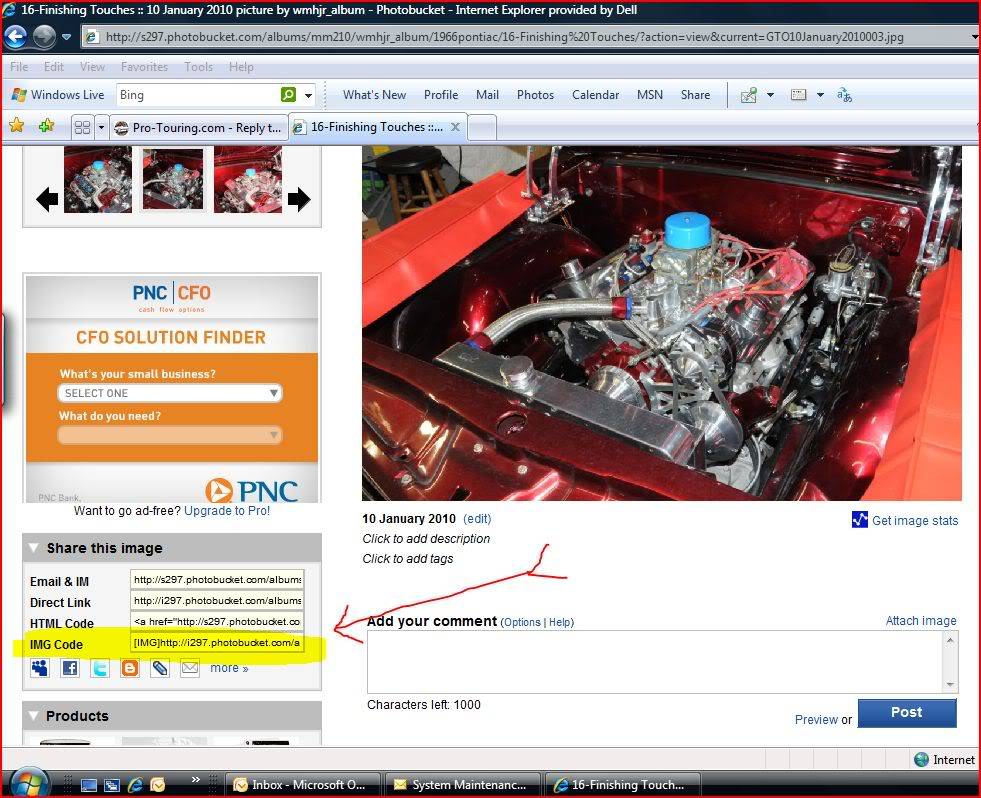
See where I highlighted in yellow and pointed a red arrow to? The IMG Code? Copy the contents of the cell to wherever you want on your post on PT. Voila!
02-18-2010 #3
Registered User
- Join Date
- Dec 2006
- Location
- oshawa ontario
- Posts
- 1,607
did it!.....thanks man!
Nascar 69 Chevelle project, 1999 Hutch Pagan Nascar chassis, 69 Chevelle body,700hp, Penske's, slicks, roadrace track day https://www.pro-touring.com/showthre...le-Cup-project
89 Iroc 406 Fitech 5 spd
01 chevy 2500HD 4x4 8.1 Allison
31 Scarab 2 x 454
03-05-2010 #4 Registered User
- Join Date
- Aug 2007
- Location
- Jonesboro, Arkansas
- Posts
- 2,506

I'm not trying to hijack this thread but I've got a question about something in this thread. How do you do a screen capture like the one you did?
Sorry for asking in your thread...
Carl
Carl Wilson
1968 Camaro - T-56 6 speed - 383 Stroker, 2014 Mustang GT seats. FiTech EFI, Tanks Inc. Tank with Deutschwerks fuel pump.
03-05-2010 #5
Registered User
- Join Date
- Aug 2006
- Location
- Belforest, AL
- Posts
- 1,092
hit the print screen button on your keyboard then open up a MS Paint or any other software and paste it in.
Todd S.
"I like to race school buses..."
03-06-2010 #6
Registered User
- Join Date
- Aug 2008
- Location
- Pgh, PA
- Posts
- 2,177
Or..... if you're using Vista or win7, search for "snipping". An executable will show up. Simply double click on it and a new utility included free with those operating systems will appear. You can right click on it and save it to your task bar. It's just like an aftermarket applet called "Snag-It". Excellent stuff! Originally Posted by minendrews68


 Reply With Quote