


Results 1 to 16 of 16
Thread: My photochop gallery
-
04-20-2005 #1

 Registered User
- Join Date
- Dec 2004
- Location
- Sarasota, Fl
- Posts
- 1,717
My photochop gallery
Well, Imageshack now has a "photo blog" feature, so I loaded one up with several of the photochops of done for myself as well as p-t.com and Stangnet.com members. If you'd like to take a look, check it out here: My car photochops gallery
-
04-21-2005 #2 Registered User
- Join Date
- Mar 2005
- Location
- westchester county new york
- Posts
- 2,995
Nice work. I really like the green 69 , dont know why. your dads ford is really cool , I have never even seen a picture of one of those.
04-21-2005 #3 Registered User
- Join Date
- Aug 2004
- Location
- OK
- Posts
- 767
great work. I have been working on a little photoshop stuff myself with the Adobe program. Alot of stuff to learn! good job!
Andrew
04-21-2005 #4dennis68 GuestThat Ford OSI is friken bad ass. I'll bet they run a few bucks huh?
04-21-2005 #5
Registered User
- Join Date
- Dec 2004
- Location
- Sarasota, Fl
- Posts
- 1,717
Yeah, I love that car, but I've yet to be able to pry it from my father. As for value, it's really difficult to say... my father paid 2400DM in '82, which was about $1800 US at the time. They're fairly uncommon to begin with and mainly in Europe, so we haven't really been able to find any recent prices or sales. There are only a few in the states (like 3 total as far as we know), including a total basket case that sold on eBay like 2 years ago. Unfortunately I only heard about the auctiona nd never got to see the auction, and I could never find out who bought it. Originally Posted by dennis68
The coolest thing for me is that I got to learn to drive in it, including a particularly stupid moment of downshifting into first. It was only at like 15 kph, but scared the crap out of me.
04-22-2005 #6 Registered User
- Join Date
- Jan 2005
- Location
- Maryland
- Posts
- 482

Great work! A lot of those you can't really tell that they are photoshoped. Nice job.
04-22-2005 #7 Moderator / Pro-Touring.com Sponsor
- Join Date
- Apr 2001
- Location
- San Jose, CA
- Posts
- 4,210
We should run a contest on the coolest photoshopped car.
Who knows what will surface and someone may build the winning photoshop car.
Tony Huntimer
RaceHome.com@Camaro.Family Camaros
1967 #QuickChangeCamaro - SpeedTech Suspension LS1/T56
1967 #CFBee - SpeedTech Suspension SuperCharged LS3/T56
1969 #TaxReturnCamaro Art Morrison Suspension 496/T56
1986 #IROCdaily - Stock IROC
04-22-2005 #8
Registered User
- Join Date
- Dec 2004
- Location
- Sarasota, Fl
- Posts
- 1,717
Thanks. I think it's obvious I spent more time on some than others. Most are pretty quick and simple, but others, like that Comet convertible 'chop were quite time consuming. Originally Posted by DJ Mabe
As for a photochop contest, I'd be in...
04-25-2005 #9 Registered User
- Join Date
- Aug 2004
- Location
- Red Deer, Alberta, Canada
- Posts
- 1,364

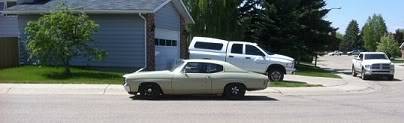
Heres a chop that I'm doing for my portfolio, nothing intense or worth making a new thread so I figured I'd add it in here. Lots of minor details that go un noticed in the image.
-MattMatt
72 Chevelle 370ci, 76mm single turbo, TKX, Speedtech Track Time, Millerbuilt Strange full floater 9", Brembo brakes, BC Forged 18x11s with 315s square
Instagram: Cst_koon
04-26-2005 #10
Registered User
- Join Date
- Dec 2004
- Location
- Sarasota, Fl
- Posts
- 1,717
Nice work Matt. I also really like the inset of the original pic... I might have to start doing that. I'm definitely gonna have to up my game to remain competitive, though I realize there I'll probably never have the skills (or is it the time?) of some of the photochoppers I've seen out there. Originally Posted by protour_chevelle
Anyone else photochopping out there?
04-26-2005 #11
Registered User
- Join Date
- Jan 2005
- Location
- Maryland
- Posts
- 482
This is a friends Cyclone. Pretty much all stock. He's wanting to put larger tires on the car with black walls. Can any of you guys photoshop this please? Just put a set of BFG drag radials on it and then another pic of the same thing with 17" wheels. He's wanting to use the stock magnum wheels but in 17" but he would like to see both. Thanks for your help.
04-26-2005 #12
Registered User
- Join Date
- Aug 2004
- Location
- Red Deer, Alberta, Canada
- Posts
- 1,364
Heres a quick 2.
-MattMatt
72 Chevelle 370ci, 76mm single turbo, TKX, Speedtech Track Time, Millerbuilt Strange full floater 9", Brembo brakes, BC Forged 18x11s with 315s square
Instagram: Cst_koon
04-28-2005 #13 Registered User
- Join Date
- Nov 2004
- Location
- Eastern Washington
- Posts
- 1,346
Could someone point me to a link describing how to change colors with PhotoShop? I want to see some different paint schemes on my car and I have yet to try that feature. I am somewhat new to PhotoShop. I though I could use the "Change Color" tool, but I cannot find it under that little band-aid in the tool bar. I am using PhotoShop 7. Thanks!
04-28-2005 #14 Registered User
- Join Date
- Feb 2005
- Location
- oregon
- Posts
- 417
This is the link that I used to learn with!!! Hope this helps!! Originally Posted by Kuhlryde
http://www.photoshopjunkie.com/tutorials/Last edited by 65chevelle''ss''; 04-28-2005 at 07:24 AM. Reason: fix
04-28-2005 #15
Registered User
- Join Date
- Nov 2004
- Location
- Eastern Washington
- Posts
- 1,346
Awesome! Thanks! On another note....mercy...this HAS to be the BEST PhotoShop site on the net....
http://www.photoshopchop.com/index.p...17_sectionid=2
05-02-2005 #16
Registered User
- Join Date
- Dec 2004
- Location
- Sarasota, Fl
- Posts
- 1,717
I added a new one to the gallery. I did it for a fellow Stangnetter:


 Reply With Quote


