


Results 1 to 20 of 20
Thread: First two point p-shop rendering
-
11-03-2008 #1

 Registered User
- Join Date
- Jul 2008
- Location
- MI
- Posts
- 152
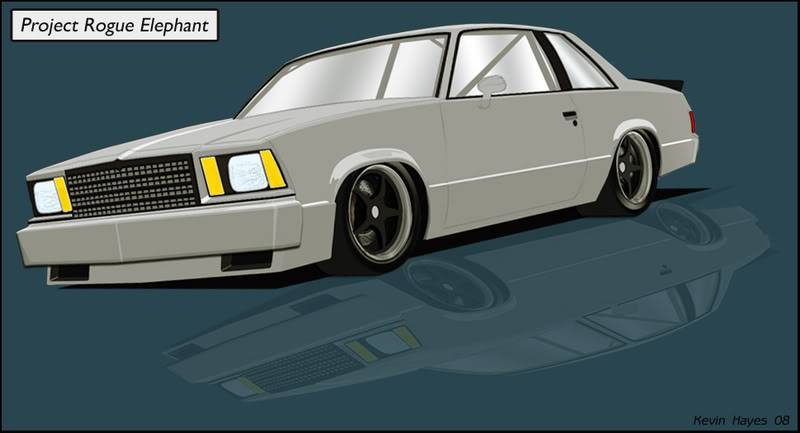
First two point p-shop rendering
Finished this yesterday.
Started with a pic of the car I'm building then ended up with this.
All done in PS and a bunch of layers.
Some edges are a bit rough and the shadow is off but it conveys the idea
-
11-03-2008 #2
Registered User
- Join Date
- Jul 2008
- Location
- Davis, CA
- Posts
- 57
looks cool!
- Brian
1971 Dodge Demon - 5.9L Magnum V8/904
Modifications: Magnumforce uppers, Wilwood discs, Autometer/Redline Gaugeworks dash
11-03-2008 #3 Registered User
- Join Date
- Jun 2007
- Location
- ST PETERSBURG,Florida
- Posts
- 144
Nice Job always loved those malibu's.For your windows use a black and white gradient so you dont have that stark white look to it.
What version of PS do you use?
11-03-2008 #4
Registered User
- Join Date
- Jul 2008
- Location
- MI
- Posts
- 152
 Originally Posted by ZVT
Thanks Sharpie and ZVT.
I have the full suite. I think it's CS3?
I did use a black and white gradient but I cut the opacity down quite a bit to show the cage bars which were drawn in a darker gray. I didn't spend too much time messing with them but I do think it would look better with a darker window. Maybe I'll mess with it some more.
Thanks for tip.
11-03-2008 #5
Registered User
- Join Date
- Oct 2008
- Posts
- 15
That looks really good. I have always loved those malibu's. They are really good looking cars once modded, and the PT style is perfect for these cars. It looks kinda like a NASCAR to me. I like it.

11-03-2008 #6
Registered User
- Join Date
- Jul 2008
- Location
- MI
- Posts
- 152
Thank you. Originally Posted by heliarclee
A little NASCAR look was just what I was after.
11-03-2008 #7
Registered User
- Join Date
- Oct 2008
- Posts
- 15
yeah, i think it looks great. How much are these cars going for now? I might look into getting one.
11-03-2008 #8
Registered User
- Join Date
- Jul 2008
- Location
- MI
- Posts
- 152
They can be had pretty cheap depending on the level of completion. Originally Posted by heliarclee
I got pretty lucky on mine if you want to check it out.
https://www.pro-touring.com/forum/sh...ad.php?t=46924
11-03-2008 #9 Registered User
- Join Date
- Oct 2007
- Location
- Buena Park, CA
- Posts
- 197
Looks Great! You can try a darker gradient (I sometimes use a subtle shade of blue-gray and black or white) on the glass and adjust the opacity to your liking. Me I sometimes go from 50% uop to 80%.
For this style try creating the same look in Adobe illustrator. Would look cool on a T-shirt.
DVDesign - Portfolio work
Website: vierstradesign.com
___________________________
Don Vierstra Automotive Design & Illustration
DV Email
11-03-2008 #10 Registered User
- Join Date
- Oct 2006
- Location
- So Cal San Dimas Ca.
- Posts
- 352
thats bad!!!
11-03-2008 #11 Full Blown G-Machiner
- Join Date
- Nov 2004
- Location
- Forney, TX
- Posts
- 738
How long did it take you to do that? I have CS3 also, but can't figure out how to do a damn thing with it. Originally Posted by project hotrod
__________________________
Boyd
1972 P/T Style Chevy Short-bed - coming soon
Specialty Auto Services
11-03-2008 #12 Registered User
- Join Date
- Oct 2005
- Location
- Greenville, IN
- Posts
- 1,072
KilleR RenderinG DudE!
 Kevin
Kevin
11-03-2008 #13
Registered User
- Join Date
- Jul 2008
- Location
- MI
- Posts
- 152
Thanks for the kind words and the tips guys. Originally Posted by Boyd
Boyd, Since this is my first two point with all new techniques I think I have about 20 hours in it.
I did use some tips from this tutorial. Give it a look, it may help.
http://husseindesign.deviantart.com/...III-I-35243447
11-04-2008 #14
Registered User
- Join Date
- Oct 2008
- Posts
- 15
I cant even imagine designing a car from scratch. I have photoshop, but I am still really new to the program. If I want to change the color of my car, how do I go about doing that? i tried selecting the body and changing the hue/saturation levels, but it just seemed to make funny looking colors. Is it because my car is black?
11-04-2008 #15
Registered User
- Join Date
- Jul 2008
- Location
- MI
- Posts
- 152
The hue / saturation levels are touchy.
The hue slider will give you the color option.
Saturation will give you richness.
Lightness is self explained.
My rendering contains at least 50 layers all drawn over a original photo of the car filter with the photocopy tool.
If you are having problems with black you may want to lighten the body up with the dodge tool to a grayish color. Once you go into the hue / saturation menu you can click the box on the right that says colorize then go from there with color adjustments.
11-04-2008 #16 Registered User
- Join Date
- Aug 2007
- Location
- Jonesboro, Arkansas
- Posts
- 2,506

I hear ya Boyd, me too!
11-04-2008 #17
Registered User
- Join Date
- Oct 2008
- Posts
- 15
Thanks for the help man, i will try that. Im determined to learn this program, so getting help from people like you is great. I really appreciate it.
11-05-2008 #18
Registered User
- Join Date
- Jul 2008
- Location
- MI
- Posts
- 152
No problem man. Originally Posted by heliarclee
I can say I've learned the most just messing around with stuff trying to get the results I'm after.
I have a ton of man hours doing magazine ads and photos but rendering is pretty new to me also.
11-06-2008 #19
Registered User
- Join Date
- Aug 2004
- Location
- Dunwoody, GA
- Posts
- 4,984
good job on the rendering. The malibu will turn out nice if that's what you're shooting for.
Trey
"The early bird may get the worm, but the second mouse gets the cheese."
~ Jon Hammond
1979 WS6 Trans Am stock LT1/T56 drive train out of my Formula. BMW M-parallel rims. C5/C6 brakes
build thread https://www.pro-touring.com/showthre...ghlight=begins
11-07-2008 #20
Registered User
- Join Date
- Jul 2008
- Location
- MI
- Posts
- 152
Thank you. Originally Posted by WS6
The rendering is what I'm shooting for real life except the wheels. I haven't decided on the actual wheel or brake size yet. It seems these choices will make or brake the budget.

 Reply With Quote




